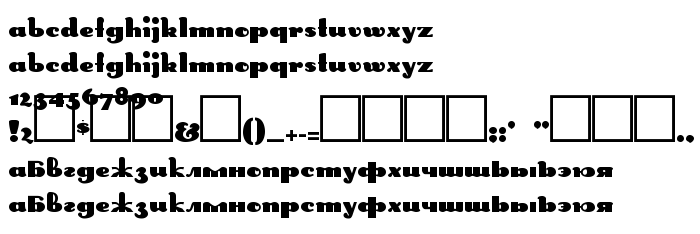
On this page you can download DS Rabbit Medium font version Version 1.1; 2000, which belongs to the family DS Rabbit (Medium tracing). Font manufacturer is DS-Rabbit-Medium. Designer - D. Rakowski (eng) & Nikolay Dubina (rus) (for communication, use the following address: mailto:[email protected]). Download DS Rabbit Medium for free on GetFonts.net. This font belongs to the following categories: cyrillic fonts, decorative fonts, latinic fonts. Font size - only 90 Kb
DS Rabbit Medium is a heavy, high-contrast display face in the Art Deco Broadway manner. Thick stems are paired with hairline strokes, the letters are wide with round forms, and the preview shows the lowercase alphabet twice in the same shapes. The figures are small and compressed at the baseline, and most punctuation positions are empty boxes. It is credited to D. Rakowski for the Latin and Nikolay Dubina for the Russian, and the categories list Cyrillic.
The look of the 1920s and 30s, from cinema marquees and jazz-age posters, stays clear in its contrast and its round shoulders. It is meant for large titles, signs, logos and short headings in vintage or glamorous themes. The hairlines are thin and the missing symbols limit it, so keep it for a few words in capitals-like forms at a large size.
| Copyright | Copyright (c) D. Rakowski (eng) & Nikolay Dubina (rus), 2000. All rights reserved. |
| Family | DS Rabbit |
| Tracing | Medium |
| Ident | D.Rakowski(eng)&NikolayDubina(rus): DS Rabbit Medium: 2000 |
| Full name | DS Rabbit Medium |
| Version | Version 1.1; 2000 |
| PostScript name | DSRabbit-Medium |
| Manufacturer | DS-Rabbit-Medium |
| Size | 90 Kb |
| Trademark | DS Rabbit Medium is a trademark of the D. Rakowski (eng) & Nikolay Dubina (rus). |
| Designer | D. Rakowski (eng) & Nikolay Dubina (rus) |
| URL of designer | mailto:[email protected] |
| URL of provider | http://vedi.d-s.ru/ |
| Description | Copyright (c) D. Rakowski (eng) & Nikolay Dubina (rus), 2000. All rights reserved. |
You can connect the font DS Rabbit Medium to your site, without downloading it from our server. All you need to do - is to follow the instructions below:
Choose the most suitable option to install the font and add this code to your site (paste it immediately after the opening tag <head>):
<link href="https://getfonts.net/allfont.css?fonts=ds-rabbit-medium" rel="stylesheet" type="text/css" />
@import url(https://getfonts.net/allfont.css?fonts=ds-rabbit-medium);
Activate the font for text in your CSS:
font-family: 'DS Rabbit Medium', arial;
Sample source code:
<html>
<head>
<link href="https://getfonts.net/allfont.css?fonts=ds-rabbit-medium" rel="stylesheet" type="text/css" />
<style>
body {
font-family : 'DS Rabbit Medium', arial;
font-size : 48px;
text-shadow : 4px 4px 4px #aaa;
}
</style>
</head>
<body>
<div>Making the Web Beautiful with DS Rabbit Medium!</div>
</body>
</html>
Result:
You can apply different styles and CSS, using our effects library, for attractive and individual appearance of your site.
 English
 Български
 Hrvatski
 Čeština
 Español
 Suomi
 Français
 Magyar
 Bahasa Indonesia
 Italiano
 Polski
 Română
 Русский
 Українська
