On this page you can download DS Brushes Normal font version Version 1.0; 2002; initial release, which belongs to the family DS Brushes (Normal tracing). Font manufacturer is DS-Brushes-Normal. Designer - Nikolay Dubina (for communication, use the following address: mailto:[email protected]). Download DS Brushes Normal for free on GetFonts.net. This font belongs to the following categories: art fonts, decorative fonts, handwritten fonts. Font size - only 287 Kb
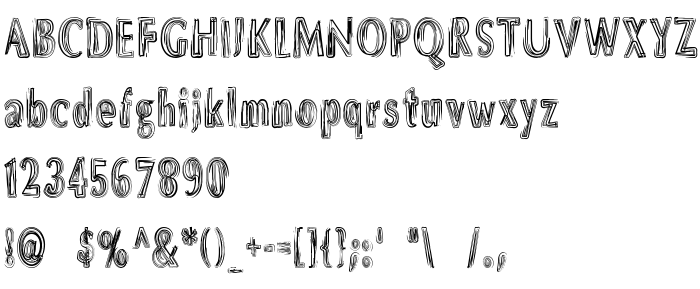
DS Brushes Normal by Nikolay Dubina is a scratchy brush-stroke script where every letter looks drawn with a multi-bristle brush, leaving several thin parallel lines inside the strokes. The letters are narrow and upright, with a rough, hand-drawn rhythm, and the lowercase, figures and symbols share the same look; Latin only.
The effect is of ink dragged across paper, expressive and a little rough, from the Art and Handwritten categories. It suits posters, album covers, art events, short headings and logos at a large size. The striped interior blurs at small sizes, and long text is tiring to follow.
| Copyright | Copyright (c) Nikolay Dubina, 2002. All rights reserved. |
| Family | DS Brushes |
| Tracing | Normal |
| Ident | NikolayDubina: DS Brushes Normal: 2002 |
| Full name | DS Brushes Normal |
| Version | Version 1.0; 2002; initial release |
| PostScript name | DSBrushes-Normal |
| Manufacturer | DS-Brushes-Normal |
| Size | 287 Kb |
| Trademark | DS Brushes Normal is a trademark of the Nikolay Dubina. |
| Designer | Nikolay Dubina |
| URL of designer | mailto:[email protected] |
| URL of provider | http://vedi.d-s.ru/ |
| Description | Use only in large size! |
You can connect the font DS Brushes Normal to your site, without downloading it from our server. All you need to do - is to follow the instructions below:
Choose the most suitable option to install the font and add this code to your site (paste it immediately after the opening tag <head>):
<link href="https://getfonts.net/allfont.css?fonts=ds-brushes-normal" rel="stylesheet" type="text/css" />
@import url(https://getfonts.net/allfont.css?fonts=ds-brushes-normal);
Activate the font for text in your CSS:
font-family: 'DS Brushes Normal', arial;
Sample source code:
<html>
<head>
<link href="https://getfonts.net/allfont.css?fonts=ds-brushes-normal" rel="stylesheet" type="text/css" />
<style>
body {
font-family : 'DS Brushes Normal', arial;
font-size : 48px;
text-shadow : 4px 4px 4px #aaa;
}
</style>
</head>
<body>
<div>Making the Web Beautiful with DS Brushes Normal!</div>
</body>
</html>
Result:
You can apply different styles and CSS, using our effects library, for attractive and individual appearance of your site.
Previous font:
Next font:
 English
 Български
 Hrvatski
 Čeština
 Español
 Suomi
 Français
 Magyar
 Bahasa Indonesia
 Italiano
 Polski
 Română
 Русский
 Українська
