On this page you can download Bazooka Regular font version Altsys Fontographer 3.5 5/26/92, which belongs to the family Bazooka (Regular tracing). Font manufacturer is Bazooka-Regular. Download Bazooka Regular for free on GetFonts.net. This font belongs to the following categories: decorative fonts, latinic fonts. Font size - only 45 Kb
| Copyright | Generated by Fontographer 3.5 |
| Family | Bazooka |
| Tracing | Regular |
| Ident | Altsys Fontographer 3.5 Bazooka Regular |
| Full name | Bazooka Regular |
| Version | Altsys Fontographer 3.5 5/26/92 |
| PostScript name | Bazooka Regular |
| Manufacturer | Bazooka-Regular |
| Size | 45 Kb |
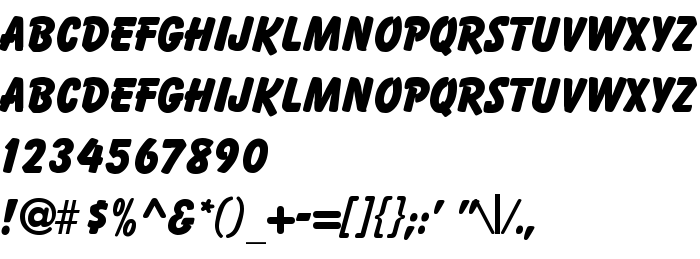
You can connect the font Bazooka Regular to your site, without downloading it from our server. All you need to do - is to follow the instructions below:
Choose the most suitable option to install the font and add this code to your site (paste it immediately after the opening tag <head>):
<link href="https://getfonts.net/allfont.css?fonts=bazooka-regular" rel="stylesheet" type="text/css" />
@import url(https://getfonts.net/allfont.css?fonts=bazooka-regular);
Activate the font for text in your CSS:
font-family: 'Bazooka Regular', arial;
Sample source code:
<html>
<head>
<link href="https://getfonts.net/allfont.css?fonts=bazooka-regular" rel="stylesheet" type="text/css" />
<style>
body {
font-family : 'Bazooka Regular', arial;
font-size : 48px;
text-shadow : 4px 4px 4px #aaa;
}
</style>
</head>
<body>
<div>Making the Web Beautiful with Bazooka Regular!</div>
</body>
</html>
Result:
You can apply different styles and CSS, using our effects library, for attractive and individual appearance of your site.
Previous font:
« Bayou
Next font:
 English
 Български
 Hrvatski
 Čeština
 Español
 Suomi
 Français
 Magyar
 Bahasa Indonesia
 Italiano
 Polski
 Română
 Русский
 Українська
