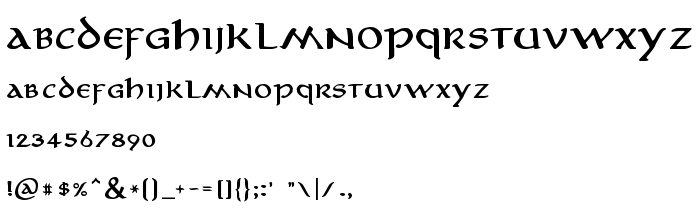
On this page you can download Aniron Bold font version Version 1.000 2004 initial release, which belongs to the family Aniron (Bold tracing). Font manufacturer is Aniron-Bold. Designer - Pete Klassen (for communication, use the following address: http://www.thehutt.de/). Download Aniron Bold for free on GetFonts.net. This font belongs to the following categories: cyrillic fonts, fonts from films, free fonts. Font size - only 145 Kb
Aniron Bold is a heavier cut of Pete Klassen's Aniron, an uncial-style face associated with the Lord of the Rings film lettering and listed here among fonts from films, with Cyrillic support. It has rounded, calligraphic capitals with a broad-pen feel, tall ascenders, and lowercase letters that borrow uncial forms such as the open a and the double-lobed h.
The Bold weight gives the thin pen strokes more body, so the elvish-medieval flavour survives on screen. It suits fantasy book covers, game titles, tavern menus, map labels and tabletop RPG materials, in headings and short lines. For long reading, the uncial forms slow the eye.
| Copyright | © Pete Klassen, 2004 - http://www.thehutt.de/ |
| Family | Aniron |
| Tracing | Bold |
| Ident | Aniron Font |
| Full name | Aniron Bold |
| Version | Version 1.000 2004 initial release |
| PostScript name | Aniron-Bold |
| Manufacturer | Aniron-Bold |
| Size | 145 Kb |
| Trademark | (C) Pete Klassen, 2004 |
| Designer | Pete Klassen |
| URL of designer | http://www.thehutt.de/ |
| License Description | The Aniron font is © Pete Klassen, 2004. All Rights Reserved. You are allowed to distribute this font free of charge only, and only with the complete contents of the original archive file included. You are allowed to use this font for private use only. Commercial use and/or modification of this font are not allowed. Aniron is based on the credits font from "Lord of the Rings". © 2001-2003 New Line Cinema and Wingnut Films. All Rights Reserved. |
You can connect the font Aniron Bold to your site, without downloading it from our server. All you need to do - is to follow the instructions below:
Choose the most suitable option to install the font and add this code to your site (paste it immediately after the opening tag <head>):
<link href="https://getfonts.net/allfont.css?fonts=aniron-bold" rel="stylesheet" type="text/css" />
@import url(https://getfonts.net/allfont.css?fonts=aniron-bold);
Activate the font for text in your CSS:
font-family: 'Aniron Bold', arial;
Sample source code:
<html>
<head>
<link href="https://getfonts.net/allfont.css?fonts=aniron-bold" rel="stylesheet" type="text/css" />
<style>
body {
font-family : 'Aniron Bold', arial;
font-size : 48px;
text-shadow : 4px 4px 4px #aaa;
}
</style>
</head>
<body>
<div>Making the Web Beautiful with Aniron Bold!</div>
</body>
</html>
Result:
You can apply different styles and CSS, using our effects library, for attractive and individual appearance of your site.
Previous font:
Next font:
Crom »
 English
 Български
 Hrvatski
 Čeština
 Español
 Suomi
 Français
 Magyar
 Bahasa Indonesia
 Italiano
 Polski
 Română
 Русский
 Українська
