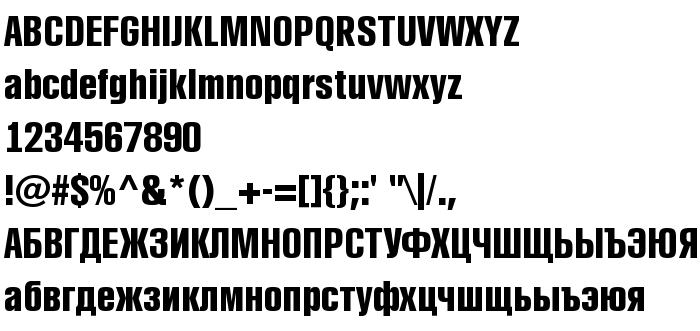
On this page you can download a_RubricaCn Bold font version Macromedia Fontographer 4.1 19.11.97, which belongs to the family a_RubricaCn (Bold tracing). Font manufacturer is a_RubricaCn-Bold. Download a_RubricaCn Bold for free on GetFonts.net. This font belongs to the following categories: cyrillic fonts, latinic fonts, russian fonts. Font size - only 43 Kb
a_RubricaCn Bold is a very heavy, condensed sans serif: tall, tightly fitted letters with straight sides, nearly closed counters and flat terminals, giving a dense, poster-like block of text. Capitals and lowercase are close in height, the figures are narrow and strong, and the category list marks Latin, Cyrillic and Russian.
The tone is blunt and forceful, in the tradition of news headlines, sports pages, packaging flashes and notices that must be seen at once. It fits short headlines, labels, signs and posters. Because it is so tightly built, it needs enough size and tracking, and it becomes heavy in paragraphs.
| Copyright | a_RubricaCondenced *Arsenal Company ©1997* FAX: (095)924-3775; e-Mail: [email protected]; Phone: (095)924-5811 (Design and Featuring W.Chufarofsky & M.Slutsker) |
| Family | a_RubricaCn |
| Tracing | Bold |
| Ident | Macromedia Fontographer 4.1 a_RubricaCn Bold |
| Full name | a_RubricaCn Bold |
| Version | Macromedia Fontographer 4.1 19.11.97 |
| PostScript name | ARubricaCnBold |
| Manufacturer | a_RubricaCn-Bold |
| Size | 43 Kb |
You can connect the font a_RubricaCn Bold to your site, without downloading it from our server. All you need to do - is to follow the instructions below:
Choose the most suitable option to install the font and add this code to your site (paste it immediately after the opening tag <head>):
<link href="https://getfonts.net/allfont.css?fonts=a_rubricacn-bold" rel="stylesheet" type="text/css" />
@import url(https://getfonts.net/allfont.css?fonts=a_rubricacn-bold);
Activate the font for text in your CSS:
font-family: 'a_RubricaCn Bold', arial;
Sample source code:
<html>
<head>
<link href="https://getfonts.net/allfont.css?fonts=a_rubricacn-bold" rel="stylesheet" type="text/css" />
<style>
body {
font-family : 'a_RubricaCn Bold', arial;
font-size : 48px;
text-shadow : 4px 4px 4px #aaa;
}
</style>
</head>
<body>
<div>Making the Web Beautiful with a_RubricaCn Bold!</div>
</body>
</html>
Result:
You can apply different styles and CSS, using our effects library, for attractive and individual appearance of your site.

Previous font:
Next font:
 English
 Български
 Hrvatski
 Čeština
 Español
 Suomi
 Français
 Magyar
 Bahasa Indonesia
 Italiano
 Polski
 Română
 Русский
 Українська